Miniapps your team builds in an afternoon.
Miniapps are interactive applications that live inside your Upside dashboard and query your healed GTM data live. Describe the tool you need in Claude, Cursor, or Upside’s hosted agent, and it deploys for the whole team, no engineering sprint, no BI project, and no more passing AI-generated HTML files back and forth over email.
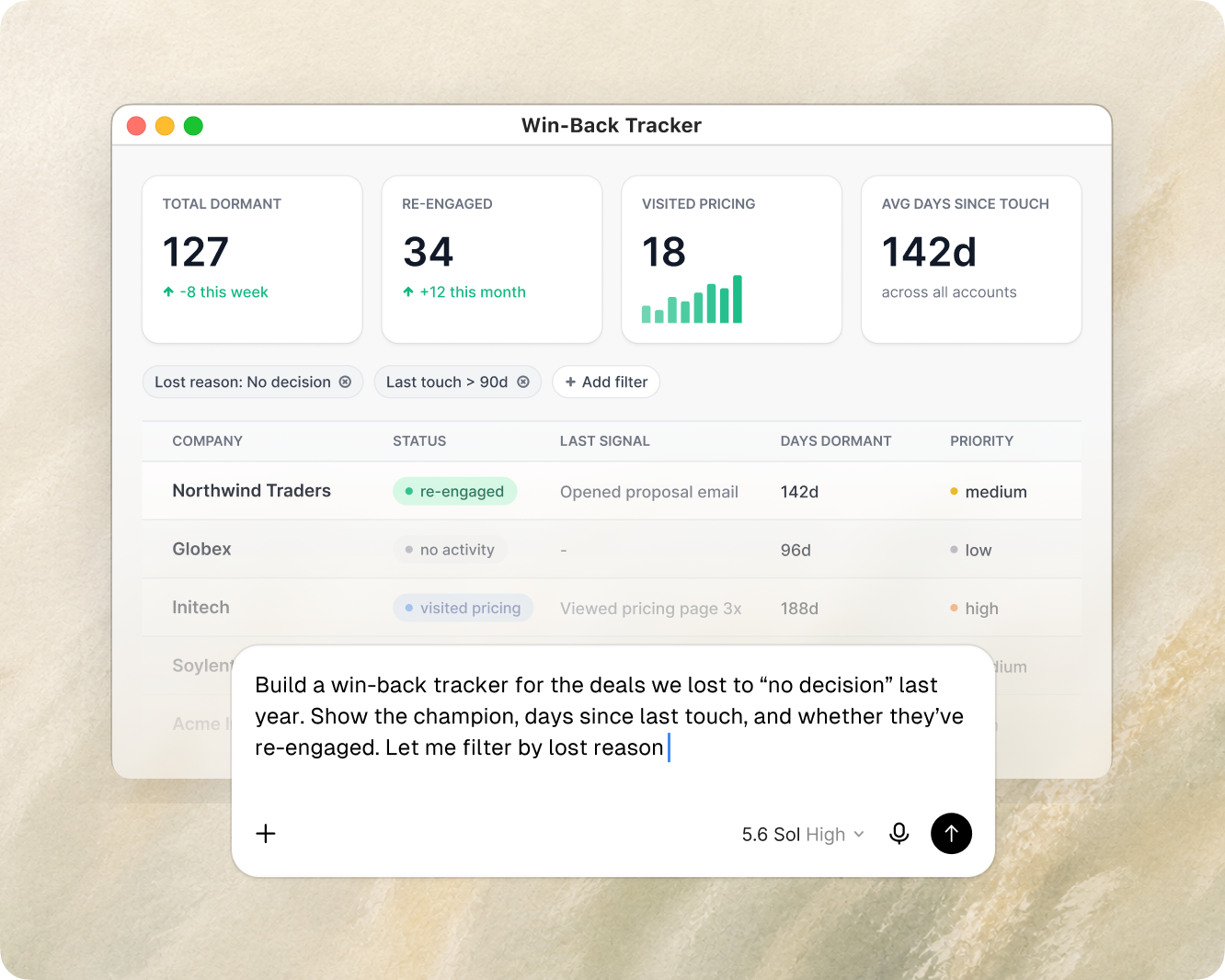
Custom views, without the queue.
Analytics tools promise build-your-own, then hand you a quarter of setup and a spot in the analyst’s backlog, so the view you needed never ships.
The old way
File a request → BI backlog
Weeks later: a static export, already stale
A miniapp
Describe it → live app
Same day, querying current data
How a miniapp gets built.
Describe what you need, let the agent build it against your data, and ship it to the dashboard.
In Claude or Cursor over MCP, or Upside’s own hosted agent right inside the dashboard. State the question and what the app should let people do.
It writes a self-contained app and wires it to your data with the Miniapp SDK: live queries, dashboard navigation, downloads. You shape the logic; the framework handles hosting and sandboxing.
Publish a versioned release into your Upside dashboard, scoped to the right people. It runs alongside your built-in analyses, on the same data.
You write the logic. Upside handles the rest.
Miniapps are the building layer. Upside provides the SDK, the hosting, and the data plumbing; what you bring is the question and the application logic.
Built from a conversation. Describe the tool in Claude, Cursor, or ChatGPT over MCP, and the agent writes the app, wires the queries, and publishes it. No engineering sprint, no BI request in the queue.
Live data, not a saved export. Each app issues SQL against your unified, healed warehouse on every load. The view reflects the current state of the business, not a snapshot someone forgot to refresh.
Self-contained and sandboxed. Each miniapp runs in a sandboxed iframe, and Upside handles hosting, serving, and isolation. There is no separate deployment infrastructure to stand up.
The SDK does the plumbing. Dashboard navigation, query execution, and downloads are exposed through the Miniapp SDK, so what you write is the logic, not the infrastructure underneath it.
The same data quality as everything else. Because apps read the same healed layer as your analyses and attribution, their outputs carry the same guarantees, not a parallel, drifting source of truth.
Made to be shared and built on.
A miniapp is a durable team asset, not a throwaway. Once it works, version it, share it with the right people, and let a teammate build the next version on top.
Versioned, with roll-back. Every change is a new version. Preview or roll back to any earlier one, so experimenting is safe and nothing gets lost.
Shared on purpose. Set who can view and who can edit independently, from just you to the whole org, so an app can become a team standard without becoming everyone's to change.
Built on, not rebuilt. A teammate can take a working version and build an improved one, or something new, on top of it, instead of starting from scratch.
Edited where you already work. Update an app from your AI tools over MCP or from Upside's hosted agent in the dashboard, then publish the new version to the team.
From a one-page report to a tool the team runs.
The same framework spans a range of apps. Most start simple and grow as the question gets sharper.
Shareable report
StaticA point-in-time snapshot, published and sent as a link.
Report with live data
Live dataRe-queries the foundation each time it opens, so the numbers stay current.
Full interactive tool
InteractiveFilters, inputs, and drill-downs the team operates day to day.
A gallery of what teams build.


Tools and reports crafted by the people closest to the work.
With the data foundation already in place, the team closest to the question can build the tool that answers it.
 Self-serve attribution
Comply’s marketing operations team built their own custom AI miniapps on the Upside MCP: the tools they wanted, made by the people who needed them, on the same foundation the rest of their analytics runs on.

“We had this idea on Tuesday. I had a draft done Wednesday and then built this out fully for all the accounts on Thursday. That was literally just like pressing a couple buttons and letting it run.”
Where miniapps fit in the platform.
Miniapps are where the rest of Upside becomes something the whole team can use. They are built through one surface, run on another, and live in a third.
The interface AI coding tools use to write, version, and publish a miniapp from a conversation.
The unified, healed warehouse every app queries live, so outputs carry the same guarantees as the rest of Upside.
Where a published app runs alongside your built-in explorers and analyses, scoped to the right people.
Questions? Answers.
The practical details, and where this fits alongside the systems your team already runs.
Do we need engineers to build these?
No. If you can describe the tool you want, in Upside’s hosted agent or a tool like Claude or Cursor, you can ship one. The agent writes the app and wires it to your data through the Miniapp SDK; Upside hosts and sandboxes it.
How is this different from embedding a BI dashboard?
A miniapp is not a saved report or an iframe pointed at a separate BI tool. It runs inside your Upside dashboard, queries your healed data live on every load, ships with version history and granular sharing, and reads the same source of truth as your other analyses. There is no second stack to license or keep in sync.
How is this different from app builders like v0, Lovable, Replit, or Superblocks?
They’re good tools, and a miniapp isn’t trying to replace one your team already prefers. It just makes getting started easy: a real app on your live GTM data, inside Upside, with no extra platform to onboard. Already have a builder you love? You can reach the same Upside data from it over MCP.
Is the data live, or a snapshot?
Live. Each app issues SQL against your unified warehouse when it loads, so it reflects the current state of the business. You can also build a deliberately static report when a fixed snapshot is what you want.
Who can see what we build?
Exactly who you choose. View and edit access are set separately on each app, anywhere from just you to your whole org, and the same rules apply in the dashboard and over MCP.
What happens when our data model changes?
Because apps query the same healed data layer everything else reads from, they follow it. There is no separate export to re-map. If a query needs updating, you create a new version and promote it when it’s ready, with the old version preserved in history.

Build the one you’ve been asking for.
Bring the report your team keeps requesting, and watch it become an app on your own data.