





MCP

Your data, in the AI tools you already use.

Upside’s MCP interface connects Claude, ChatGPT, Cursor, and the rest of your AI stack to one endpoint over the same healed go-to-market data foundation that powers every Upside dashboard and report. Ask, build, and ship without leaving your workflow.

See the tool list
claude — connected to upside
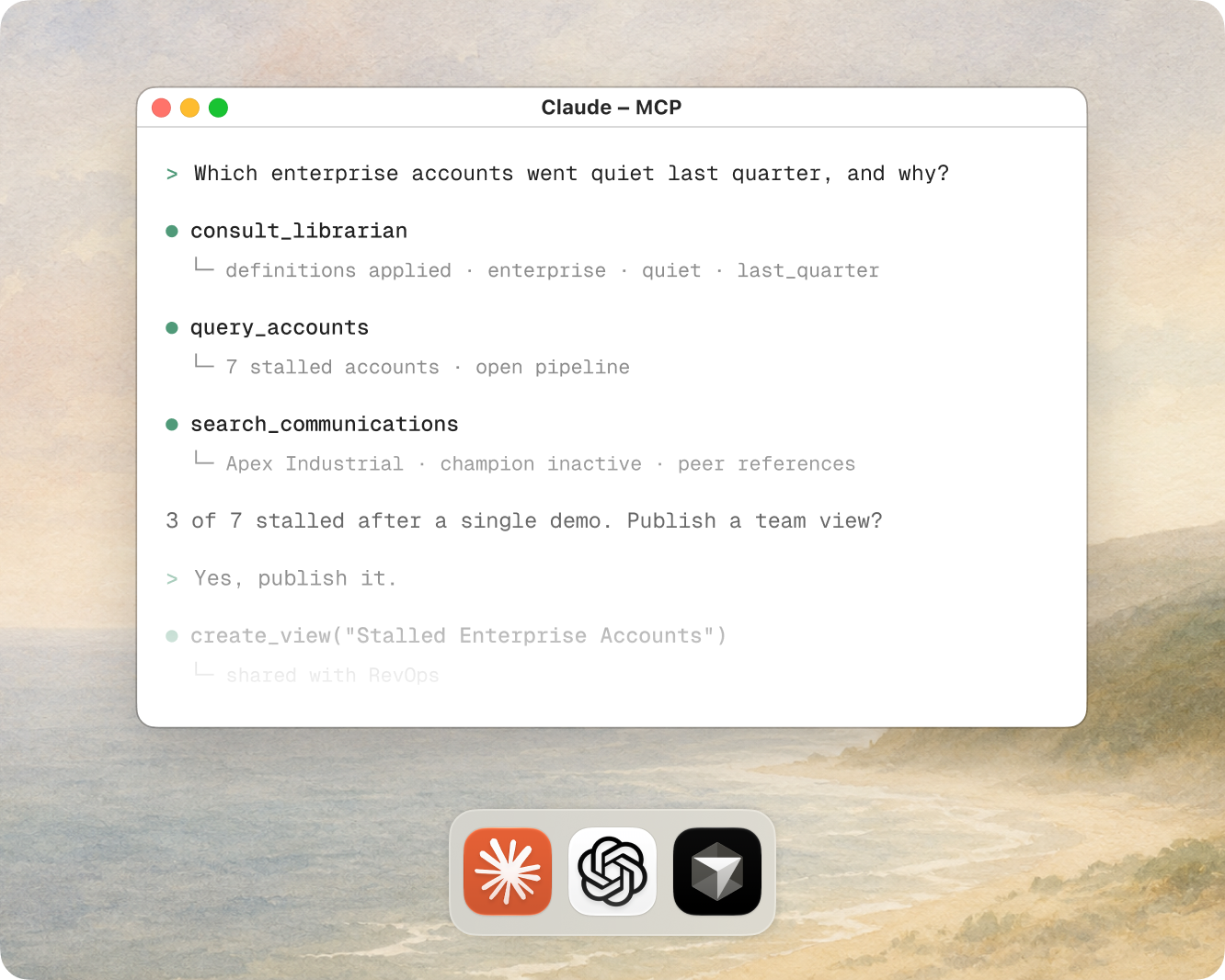
>Which enterprise accounts went quiet last quarter, and what were they actually worried about?
consult_librarian(intent: "find stalled enterprise accounts")
Radiant coaches
·“enterprise” = Segment field, not headcount
·“quiet” = no logged touch in 90d · read the Activity Timeline, not a CRM field
·fiscal Q ends Jan 31, so “last quarter” = Aug–Oct
·open pipeline only · IS_CLOSED = false (don’t count Closed Lost)
?Confirm the silence window — 30, 60, or 90 days?
read_doc(schema + field conventions)
execute_sql(enterprise · 0 meetings in Q1)
7 accounts · incl. Apex Industrial Corp ($240K open)
search_communications("champion going dark", budget)
Apex: peer references to Meridian Energy + Crestview Resources; 12 nurture emails Mar–May, none drove a replyextracted
3 of the 7 stalled after a single demo. Apex’s interest traced to peer companies, not the email nurture it received. Want this as a dashboard for the team?
>Yes, publish it.
miniapp_create("Stalled Enterprise Accounts")
published to the Hooli dashboard · shareable link
>

One pipe, every AI tool, the same foundation.

Whatever AI client your team reaches for connects to the same MCP endpoint, and that endpoint reads the same healed foundation as the rest of Upside. Connect once, and the surface area is whatever your team can build.

Claude
ChatGPT
Cursor
Notion AI
Glean
Dust
Upside MCP
one endpoint
Healed data foundation
1 · CONNECT
Authorize once

Connect your AI client to Upside over OAuth. It acts as you, sees only your workspace, and the connection can be revoked at any time.

2 · ASK
Work in plain language

Ask questions, search conversations, and run analyses in the same thread where you are already reasoning. The agent reads your schema before it queries.

3 · BUILD
Ship it to the team

Turn a useful answer into a published Miniapp, or save a convention so the next query gets it right. The work persists past the conversation.

Point your AI at data that’s actually correct.

Pointed straight at the CRM, an AI client reasons over duplicated contacts and unlogged touchpoints. The answer comes back confident and wrong.

Point an AI client straight at your systems
Connect the client through Upside’s MCP
Stitches Salesforce, HubSpot, Gong, and the warehouse together on the fly, however the model guesses
Reads one pre-compiled record that already reconciles every source
Reasons over duplicated contacts and conflicting fields
Reasons over a deduplicated, healed layer
Can only see what a rep remembered to log
Searches the emails and transcripts the CRM never captured
Guesses at your schema and field conventions
Reads your schema and conventions before querying
A separate, ungoverned path for every tool
One connection, authenticated as you, scoped to your workspace

Upside does the reconciling first. Instead of pointing the model at a dozen systems and hoping it untangles them, you hand it one legible, pre-compiled record of what actually happened. The AI tool is the interface; Upside is the data layer underneath.

The Upside toolbox for agents.

The MCP interface is a real set of tools, not a black box. Each one is the same building block our own agents use, exposed to whatever client you connect. Here is the working roster.

consult_librarian
Ask the librarian first

Before the agent queries, it asks Radiant for this org’s conventions, the right field names, your fiscal calendar, stage definitions that differ from the defaults, so the query runs on your ground truth instead of generic guesses. Enforced as a mandatory step, not a suggestion.

execute_sql
Query in plain language

Ask “which enterprise accounts had no meetings in Q1?” and the agent writes the SQL, runs it against your unified warehouse, and returns the answer in the thread. No SQL required from you, and full introspection (SHOW TABLES, DESCRIBE) so the agent can orient first.

search_communications
Search the unstructured record

Full-text and semantic search across ingested emails and meeting transcripts. A search for “champion going dark” finds the right exchange even when those words never appear, linked back to the account, contact, and opportunity.

list_docs · read_doc
Read the platform docs

The agent pulls Upside’s schema and tool documentation on its own, so it understands your field names and data rules instead of guessing. Fewer silent errors, no pasting schema into every prompt.

create_knowledge_entry · list_knowledge_entries
Teach it your conventions

When a query gets something wrong, save the correct convention as a knowledge entry, in context, from the same thread. The librarian reads it on the next query, so the mistake does not happen twice.

workspace_create · workspace_write_file · miniapp_create · miniapp_version_create
Build and publish Miniapps

Build the app’s files in an isolated workspace, then deploy them as a versioned, shareable dashboard, scoped to specific users or the whole org, built from the conversation.

trigger_remote_analysis
Trigger an analysis over a cohortComing soon

Start any of Upside’s registered analyses, from Pipedash attribution to Deep Research report types, over a cohort scoped by a SQL query or a list of IDs, without leaving your AI tool. Results will run in Upside and land back there, cited, alongside everything else.

Already in production.

Two teams connected the MCP to tools they already ran, and put it to work inside a week.

Case study

Three mini-apps, built in minutes.

Comply’s ops team built three AI mini-apps directly on the Upside MCP and demoed them at a GTM Engineers webinar. No BI ticket, no engineers. All of it ran on one healed record: 27.5M+ touchpoints across 18 self-serve users.

27.5M+ touchpoints unified18 self-serve users
Honestly, the first time I found a huge use case for AI for me. A tool that has the data organized, and I can query it thinking the way I think.
Carl Gunlefinger · Senior Marketing Operations Manager, Comply
Read the Comply story
Case study

Their own AI tool, twice as accurate.

Assembled pointed Dust, the AI tool their team already ran, at the Upside MCP. Pipeline queries came back about 2x more accurate and complete than querying Salesforce directly. In the first week, Dust made 2,300+ MCP calls across the CEO, marketing, and ops.

~2x more accurate vs. Salesforce2,300+ MCP calls, week one
Things that used to take me hours to pull, I’m getting them in Upside in minutes. Instead of having to pick what questions to ask based on how long it will take to get a verifiable answer, with a quick MCP search, I’m uncovering issues I didn’t even know existed.
Lindsey Marymont · Head of Demand Generation, Assembled
Read the Assembled story

One surface of the platform.

MCP is how you reach Upside from outside Upside, over the same reconstructed foundation the dashboard and the reports read from, so a question asked over MCP comes back matching what the team sees in the UI.

Runs on
Data Foundation

The unified, healed record every MCP query reads from.

Build & publish via
Miniapps

Turn a query into a shareable dashboard, deployed from your AI client.

Explore results in
Dashboard

The same data, as pre-built explorers and report cards for the whole team.

Coached by
Radiant

The knowledge library your agent consults before acting. Manage the library over MCP today; the active memory layer is coming.

Run analyses with
Deep Research

Structured, cited analyses you can trigger and read back.

See it in a workflow
AI-native GTM workflows

How teams wire Upside into the AI tools they already run.

Frequently asked questions

How is this different from just connecting Claude to Salesforce?

The connection is the easy part; the data underneath is the difference. Pointed straight at the CRM, an AI client reasons over duplicated contacts, half-filled fields, and touchpoints nobody logged. Upside heals and unifies that data first, and adds the emails and transcripts the CRM never captured, so the same question is answered against a clean, unified record instead of raw CRM exports.

Which AI tools can connect?

Any MCP-compatible client. Today that includes Claude, ChatGPT, Cursor, Notion AI, Glean, and Dust, and the list grows as the standard does. The same endpoint serves all of them, so there is nothing to rebuild per tool.

Do I need to know SQL?

No. You ask in plain language and the agent writes and runs the read-only SQL for you. If you do write SQL, the full read-only surface is there, including schema introspection, so technical users can script and reproduce analyses.

What can the AI actually see, and can it change anything?

It sees only the workspace of the user who connected it, and queries run read-only, so they can never modify your data. Connections authenticate as you over OAuth and can be revoked at any time. There is no shared service account.

Does this replace the dashboard?

No. It’s the same data foundation reached a different way. Some of your team will live in the dashboard’s explorers and report cards; others will stay in their AI tools and query over MCP. Both read the same source of truth, so the numbers match.

Connect Upside to the tools you already use.

Ask your own hardest question, in your own AI client, against your own data.

See the tool list →